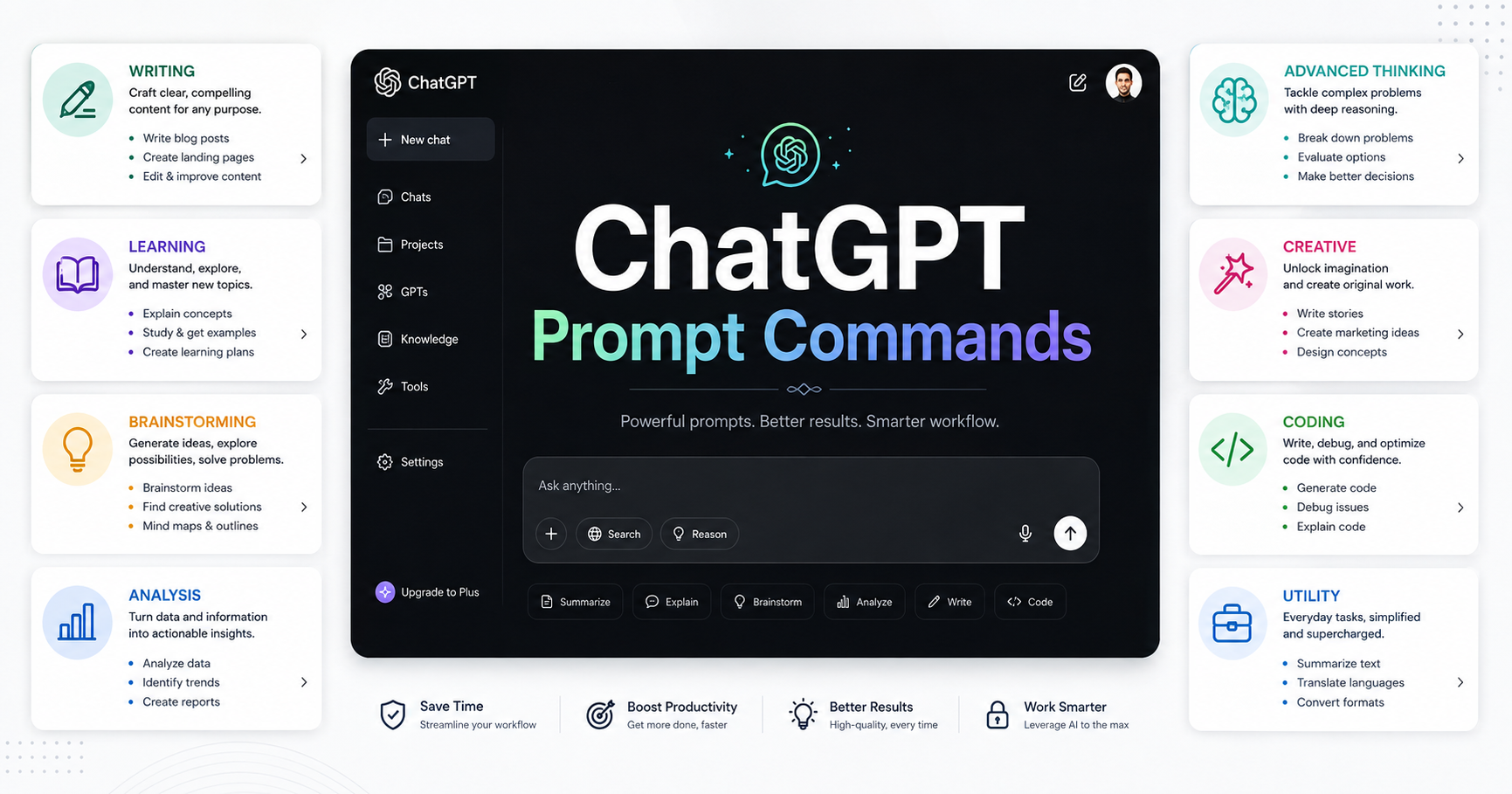
80+ ChatGPT Prompt Commands for Better AI Results
A structured library of prompt commands for writing, explanations, learning, brainstorming, analysis, advanced thinking, creative work, coding, and everyday AI tasks.
ChatGPT can produce very different types of responses depending on how you frame your request. A simple instruction can ask for a rewrite, while another can ask for a detailed explanation, structured comparison, critique, brainstorming session, or step-by-step process.
This prompt command library organizes those needs into practical groups. You can use the commands as shorthand instructions when you want to guide the structure, depth, format, or purpose of a response.
The commands in this guide come from the supplied prompt library. They are presented as reusable instructions and frameworks, rather than as claims about official ChatGPT features.
How to Use ChatGPT Prompt Commands
A prompt command works best when it clearly communicates what you want the response to do. You can place a command before your request or combine it with additional context.
/rewrite
Rewrite the following paragraph while keeping the original meaning and improving clarity.
You can also combine a task with a desired output format. For example, a request could ask for a complex subject to be explained simply and then converted into a checklist.
The most useful approach is to select the command that matches your immediate goal. Then provide the content, question, context, or constraints needed to complete that task.
Writing and Style Commands
These commands focus on rewriting, editing, expanding, simplifying, and changing the tone of text.
/human
Rewrites text so it sounds natural rather than robotic.
/rewrite
Rephrases content while keeping its core meaning.
/improve
Improves clarity, flow, and overall quality.
/shorten
Condenses content into a tighter version.
/expand
Adds detail, depth, and supporting context.
/simplify
Makes text easier to understand with plainer language.
/formal
Changes the tone to a professional style.
/casual
Changes the tone to a relaxed and conversational style.
Explanation Commands
Explanation commands help control how much detail and technical depth you want. They can be useful when the same subject needs to be presented for different levels of understanding.
ELI5
Explains a subject at a very simple level.
EL10
Uses simple language with slightly more depth.
EL15
Provides moderate detail at a basic teen level.
ELICollege
Provides academic depth and rigor.
ELIPhD
Provides a highly advanced and technical explanation.
/analogies
Explains ideas using comparisons to familiar concepts.
/deep
Provides a more detailed and layered explanation.
/why
Focuses on the reason or mechanism behind something.
/firstprinciples
Breaks a topic down to fundamental truths.
Formatting and Output Commands
Sometimes the information is useful, but the format makes it difficult to work with. These commands focus on changing the structure of the response.
TLDR
Creates the shortest useful summary.
BULLETS
Turns information into bullet points.
TABLE
Formats information as a comparison or reference table.
CHECKLIST
Converts information into an actionable checklist.
STEPS
Turns a process into a step-by-step structure.
/outline
Organizes content into a structured outline.
/summary
Creates a concise summary of the main points.
/keypoints
Pulls out only the most important takeaways.
Learning and Study Commands
These prompts change a piece of information into a learning activity. They can turn material into questions, flashcards, guided discussions, or simplified explanations.
QUIZME
Creates quiz questions from the material.
FLASHCARDS
Turns material into flashcard-style questions and answers.
TESTME
Tests understanding with questions.
SOCRATIC
Teaches through guided questions.
/socratic
Switches the response into a question-led teaching style.
FEYNMAN
Explains a subject as simply as possible for understanding.
MISCONCEPTIONS
Lists common misunderstandings about a topic.
TIMELINE
Organizes information into chronological order.
/teachme
Frames the response as a lesson.
Brainstorming and Idea Commands
Brainstorming commands help generate alternatives, hooks, variations, and broader creative directions.
IDEAS10
Generates 10 ideas around a topic.
ALT3
Provides three different alternatives.
HOOKS10
Generates 10 hook ideas for content.
HOOK10
Creates 10 short hook options for testing.
IDEAGEN
Produces a wider spread of idea directions.
SCAMPER
Uses the SCAMPER creativity framework.
REMIX
Combines two concepts into a new hybrid idea.
/brainstorm100
Pushes for a large batch of ideas.
/viralhooks
Generates hooks designed to grab attention quickly.
Analysis and Decision-Making Commands
These commands focus on examining options, identifying risks, challenging assumptions, and creating structured decision processes.
PROSCONS
Lists advantages and disadvantages.
SWOT
Examines strengths, weaknesses, opportunities, and threats.
COMPARE
Compares two or more options side by side.
/assumptions
Identifies hidden assumptions in a claim.
/counter
Generates the strongest counterargument.
/debate
Explores both sides of an issue in a balanced way.
/steelman
Builds the strongest version of an opposing argument.
/devilsadvocate
Challenges an idea by arguing against it.
RISKMAP
Identifies key risks in a plan.
SECONDORDER
Looks beyond first effects to later consequences.
REDTEAM
Critiques an idea aggressively to expose weaknesses.
DECIDE
Creates a structured decision framework.
PARETO
Finds the small actions that drive most results.
Advanced Thinking Systems
The advanced thinking group provides structured ways to decompose problems, examine systems, challenge assumptions, and explore possible explanations.
DELTR
Decomposes, evaluates, limits, transforms, and rebuilds an idea.
OODA
Uses an observe, orient, decide, and act structure.
KILLCRITIC
Forces blunt critique focused on flaws.
PARADOX
Looks for contradictions inside an idea.
LENSSTACK
Examines a topic through multiple perspectives.
X10THINK
Requests deeper consideration before answering.
HIDDENASSUMPTIONS
Surfaces assumptions that are easy to miss.
FRACTAL
Explores a subject by zooming in and out across levels.
BLACKSWAN
Focuses on rare but high-impact possibilities.
REVERSEENGINEER
Works backward to infer how something functions.
SIGNALVSNOISE
Separates useful information from distractions.
HYPOTHESISGEN
Generates multiple explanations for an observation.
SYSTEMMAP
Maps actors, forces, and relationships in a system.
META
Examines the framing of the question itself.
Creative and Content Commands
Creative commands change the way a response is presented. They can be useful for simulations, predictions, narrative formats, scripts, and social content structures.
/simulate
Simulates a scenario, conversation, or role-play.
/predict
Projects likely future outcomes.
/futurehistory
Describes the future as if it were already remembered.
/reverse
Describes failure first and then works backward to invert it.
SCRIPT
Formats output like a script for video or dialogue.
THREAD
Structures a response like a social media thread.
/storymode
Shifts the answer into a narrative-driven style.
Coding Commands
The coding section contains focused commands for debugging, understanding, and improving code.
DEBUG
Finds likely bugs or errors in code.
EXPLAINCODE
Explains what code is doing in plain language.
OPTIMIZE
Improves code for speed, efficiency, or cleanliness.
DEBUG
Review the following code and identify likely bugs or errors. Explain each issue clearly and suggest a practical fix.
Utility and Power Commands
Utility commands cover common transformations, explanations, examples, use cases, critiques, and prompt improvement tasks.
/convert
Converts content from one format to another.
/translate
Translates text into another language.
/tonechange
Changes the emotional or stylistic tone.
/examples
Adds examples to make an idea easier to understand.
/usecases
Lists practical situations where an idea applies.
/breakdown
Splits a complex topic into smaller parts.
/stepbystep
Forces a sequential process.
/insights
Pulls out notable observations or patterns.
/clarify
Clears up ambiguity and makes meaning more precise.
/expandideas
Takes a rough idea and develops it further.
/compress
Shrinks content while preserving the main message.
/reframe
Presents the same idea from a different angle.
/coach
Frames the answer as guidance from a coach or mentor.
/critique
Reviews work and points out what needs improvement.
/improvehooks
Refines hooks to make them more compelling.
/systemrewrite
Rewrites text to feel more structured and systemized.
/autoprompt
Generates a better prompt from a rough request.
/godmode
Requests a more assertive and comprehensive response.
How to Build a Practical Prompt Workflow
A large prompt library becomes more useful when you organize commands around the task you are trying to complete.
/deep
/outline
Explain the topic below in detail. Organize the response into a clear outline and include practical examples.
The key idea is to match the command to the result you need. You do not need to use every command. A small set of commands that fits your regular tasks can be easier to remember and apply.
Frequently Asked Questions
What are ChatGPT prompt commands?
In this guide, prompt commands are reusable shorthand instructions that describe how you want an AI response to be written, explained, formatted, analyzed, or transformed.
Can prompt commands be combined?
Yes. The supplied prompt library includes commands for different aspects of a response, so you can combine a task with instructions about depth, structure, or presentation.
Which command should I use for rewriting?
Use /rewrite when you want to rephrase content while keeping its core meaning. You can use /improve when your priority is clarity, flow, and overall quality.
Which commands help with studying?
QUIZME, FLASHCARDS, TESTME, SOCRATIC, FEYNMAN, MISCONCEPTIONS, TIMELINE, and /teachme are included in the learning and study section.
Which commands help with decision making?
PROSCONS, SWOT, COMPARE, /assumptions, /counter, /debate, /steelman, /devilsadvocate, RISKMAP, SECONDORDER, REDTEAM, DECIDE, and PARETO are designed for analysis and decision-making tasks.
Which commands can help with coding?
The supplied library includes DEBUG, EXPLAINCODE, and OPTIMIZE for debugging, code explanation, and code improvement.
Are these official ChatGPT commands?
The source material presents these as a prompt library. It does not establish that they are official ChatGPT commands or built-in product features. They should therefore be treated as reusable prompt instructions.
Conclusion
A well-organized prompt library gives you a practical way to describe the kind of response you want. The commands in this collection cover writing, explanation, formatting, learning, brainstorming, analysis, advanced thinking, creative work, coding, and utility tasks.
Start with the command that matches your goal. Add context and constraints. Then refine the result with a second command when necessary.
Build Your Own Prompt Toolkit
Save the commands you use most often and organize them by the tasks you perform regularly. A focused personal library can make your prompting workflow easier to reuse.


Comments (0)
No comments yet. Be the first to share your thoughts!
Leave a Comment