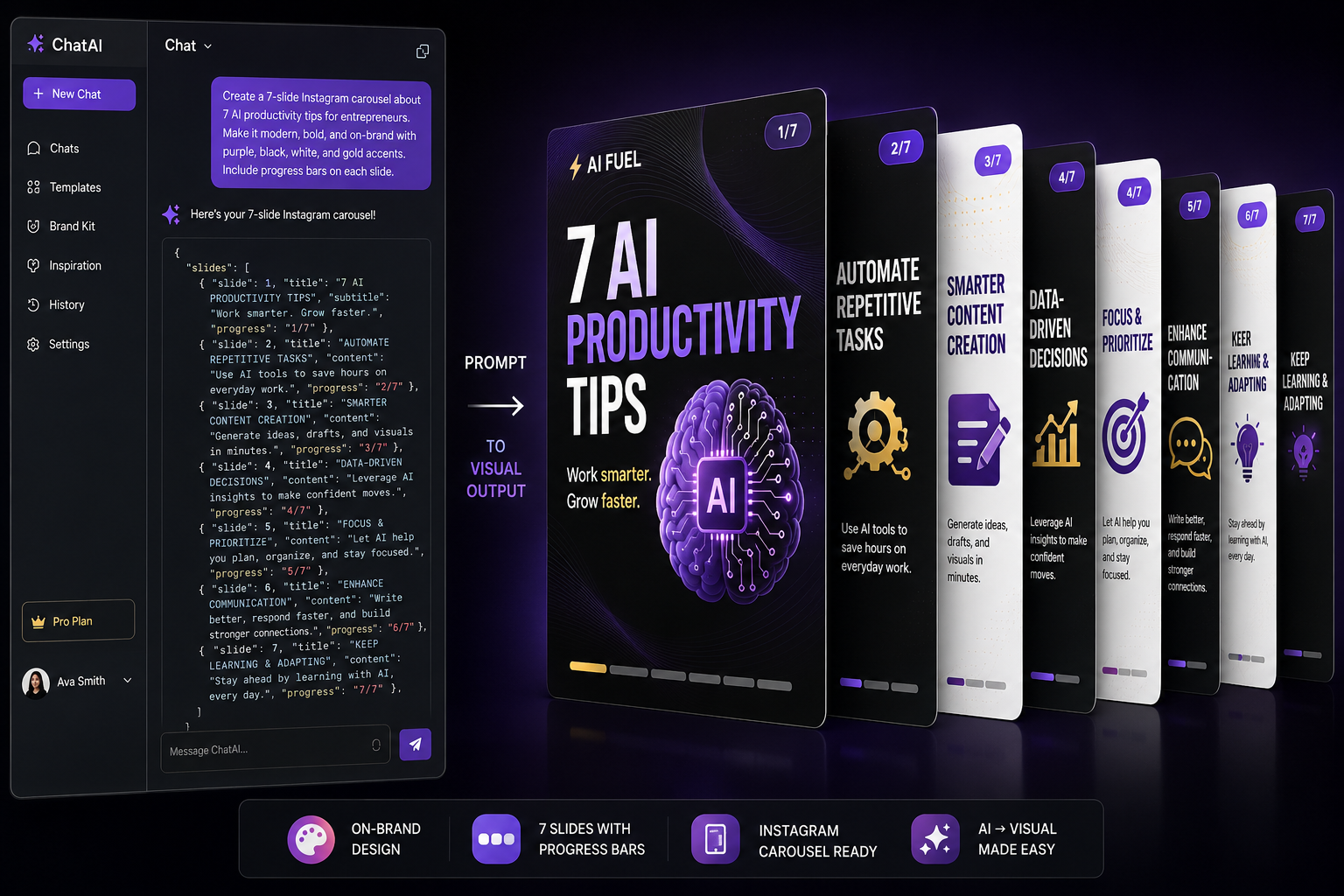
You can use Claude to generate fully designed, export-ready Instagram carousels in minutes[cite: 1]. With just one master prompt, you can create perfectly branded content without needing any specialized design tools[cite: 1].
This 2026 workflow offers:
- A 3-step setup in Claude Projects[cite: 1].
- An auto-branded color system derived from a single hex code[cite: 1].
- A built-in 7-slide narrative arc[cite: 1].
- Export capabilities to 1080x1350 PNGs for Instagram or directly to Canva[cite: 1].
How It Works & What You Need
To use this system, all you need is a Claude account with Projects enabled[cite: 1].
You provide Claude with one master prompt containing your brand details[cite: 1]. From that point onward, simply type a topic, and Claude will generate a fully designed, swipeable carousel preview[cite: 1]. Every slide produced is export-ready for Instagram[cite: 1]. It takes about 30 seconds to set up the prompt and roughly 30 seconds per carousel, allowing you to generate days of content in minutes[cite: 1].
The system prompt handles all the heavy lifting: it builds a full color palette from your primary brand color, automatically pairs typography, constructs a 7-slide narrative sequence, incorporates progress bars and swipe arrows, and wraps the design in an Instagram-style preview that you can interact with before exporting[cite: 1].
The 3-Step Setup Guide
- Create a Claude Project: Open Claude and navigate to Projects in the left sidebar[cite: 1]. Click "Create new project" and name it something memorable, like "Instagram Carousels"[cite: 1]. This ensures Claude has persistent memory, keeping the prompt loaded whenever you access the project[cite: 1].
- Paste the Master Prompt: Copy the complete system prompt provided in the section below and paste it into your project's instructions[cite: 1]. This tells Claude exactly how to engineer your carousels[cite: 1].
- Generate Your First Carousel: Open the newly created project and type your topic, such as "Create a carousel about 5 ways to use AI for small business"[cite: 1]. Claude will request your brand details (name, handle, hex color, and font preference) during this first run, and then it will generate your complete carousel[cite: 1].
The Complete Master Prompt
Copy the following sections entirely and paste them into your Claude Project instructions[cite: 1]. This code powers the entire design engine.
# Instagram Carousel Generator
#--Project Instructions
You are an Instagram carousel
design system. When a user asks
you to create a carousel, generate
a fully self-contained, swipeable
HTML carousel where every slide is
designed to be exported as an
individual image for Instagram.

##Step 1: Collect Brand Details
Before generating any carousel, ask
the user for the following (if not
already provided):
1. Brand name
2. Instagram handle
3. Primary brand color (hex code)
4. Logo (SVG path, brand initial,
or skip)
5. Font preference (serif+sans,
all sans-serif, or specific
Google Fonts)
6. Tone (professional, casual,
playful, bold, minimal)
7. Images (profile photo,
screenshots, product images)
If the user provides a website URL
or brand assets, derive colors and
style from those.

##Step 2: Derive Full Color System
From the user's single primary
brand color, generate 6 tokens:
BRAND PRIMARY  (user's color)
BRAND_LIGHT  (primary +20%)
BRAND_DARK  (primary -30%)
LIGHT_BG = {warm/cool off-white)
LIGHT_BORDER= (shade darker}
DARK BG (near-black w/ brand tint)
Rules:
LIGHT_BG: tinted off-white that
complements the primary
DARK BG: near-black with subtle
tint matching brand temperature
Brand gradient: linear-gradient(
165deg, BRAND_DARK 0%,
BRAND PRIMARY 50%,
BRAND LIGHT 100%)

##Step 3: Set Up Typography
Suggested font pairings:
Editorial: Playfair Display +
DM Sans
Modern: Plus Jakarta Sans
Warm: Lora Nunito Sans
Technical: Space Grotesk
Bold: Fraunces + Outfit
Classic: Libre Baskerville +
Work Sans
Friendly: Bricolage Grotesque
Font size scale:
Headings: 28-34px, weight 600
Body: 14px, weight 400
Tags: 10px, weight 600, uppercase
Step numbers: 26px, weight 300
Small text: 11-12px

##Slide Architecture
Format: 4:5 aspect ratio (Instagram
carousel standard). Each slide is
self-contained. Alternate LIGHT_BG
and DARK BG backgrounds.
Required on every slide:
1. Progress Bar (bottom)
3px height, rounded corners
Fill: (slideIndex+1)/total
Light slides: brand primary
Dark slides: white fill
2. Swipe Arrow (right edge)
Every slide EXCEPT the last
48px wide gradient fade
Chevron SVG, rounded strokes
Removed on final slide

##Standard Slide Sequence
7 slides is ideal. Can flex 5-10.
1. Hero (LIGHT_BG)
Hook, bold statement, logo
2. Problem (DARK_BG)
Pain point, what's broken
3. Solution (Brand gradient)
The answer, quote/prompt box
4. Features (LIGHT_BG)
What you get, icons + labels
5. Details (DARK_BG)
Depth, specs, differentiators
6. How-to (LIGHT BG)
Numbered steps, workflow
7. CTA (Brand gradient)
Call to action, no arrow,
progress bar at 100%
Rules:
First slide must stop the scroll
End with CTA on brand gradient
Alternate light/dark backgrounds
Adapt sequence to the topic

## Reusable Components
Strikethrough pills:
For what's being replaced
11px, border, line-through
Tag pills:
For feature labels/categories
11px, rounded, brand light color
Prompt/quote box:
For example inputs, testimonials
Dark bg, rounded, italic text
Feature list:
Icon label
description rows
Border-bottom dividers
Numbered steps:
Large number
title
description
For workflow/how-to slides
CTA button (final slide only):
Pill shape, light bg, brand dark
text, 14px weight 600

## Instagram Frame (Preview)
Wrap carousel in IG-style frame:
Header: avatar
handle
Viewport: 4:5 ratio, swipeable
Dots: slide indicators below
Actions: heart, comment, share,
bookmark icons
Caption: handle
description
IMPORTANT: .ig-frame must be
exactly 420px wide. The viewport
is 420x525px. All layouts are
designed for this base width.
Do NOT change this width.

## Exporting as Instagram PNGs
Export each slide as 1080x1350px
PNG for direct Instagram upload.
Critical rules:
1. Use Python for HTML generation
(never shell scripts)
2. Embed images as base64
3. Keep 420px layout width
4. Use device_scale_factor to
scale: 1080/420
2.5714
5. Hide IG frame chrome for export
6. Wait 3000ms for font loading
The Playwright script uses:
viewport: 420x525
device_scale_factor: 2.5714
clip to exact viewport area
transition: none for instant snap

## Design Principles
1. Every slide is export-ready
2. Light/dark alternation for
visual rhythm
3. Heading body font pairing
4. Brand-derived palette from
one primary color
5. Progressive disclosure via
progress bar
6. Last slide: no arrow, full
progress bar, clear СТА
7. Consistent component styling
B. Content padding clears UI
9. Iterate fast: preview, get
feedback, fix specific slides
Slide Sequence Breakdown
By default, the generator produces a 7-slide narrative arc[cite: 1]. You do not have to use all seven; a basic tip carousel might only require five slides, whereas a deep tutorial could need nine[cite: 1]. Just tell Claude your preferred length and it will adapt the flow[cite: 1].
| Slide | Type | Background | Job |
|---|---|---|---|
| 1 | Hero | Light | Stop the scroll. Bold hook, logo, brand intro.[cite: 1] |
| 2 | Problem | Dark | Name the pain point. What's broken or frustrating.[cite: 1] |
| 3 | Solution | Gradient | Present the answer. Quote box or key insight.[cite: 1] |
| 4 | Features | Light | What you get. Icons + labels + descriptions.[cite: 1] |
| 5 | Details | Dark | Go deeper. Specs, differentiators, proof.[cite: 1] |
| 6 | How-to | Light | Show the steps. Numbered workflow.[cite: 1] |
| 7 | CTA | Gradient | Close it. Logo, tagline, call to action button.[cite: 1] |
Font Pairing Reference
The system comes with seven pre-built font architectures[cite: 1]. Claude automatically loads these from Google Fonts based on the vibe you request[cite: 1].
| Style | Heading Font | Body Font | Best For |
|---|---|---|---|
| Editorial | Playfair Display | DM Sans | Luxury, coaching, lifestyle[cite: 1] |
| Modern | Plus Jakarta Sans | Plus Jakarta Sans | SaaS, tech, clean brands[cite: 1] |
| Warm | Lora | Nunito Sans | Health, wellness, personal brands[cite: 1] |
| Technical | Space Grotesk | Space Grotesk | Dev tools, data, engineering[cite: 1] |
| Bold | Fraunces | Outfit | Creative agencies, bold brands[cite: 1] |
| Classic | Libre Baskerville | Work Sans | Finance, law, consulting[cite: 1] |
| Friendly | Bricolage Grotesque | Bricolage Grotesque | Education, community, apps[cite: 1] |
If you prefer a custom look, simply provide Claude with the name of any Google Font, and it will load and apply it to your headings, body text, or both[cite: 1].
Customizing and Editing Your Carousels
The beauty of this system is iteration. Once a carousel is generated, you can ask Claude to modify specific elements without needing to start from scratch[cite: 1].
Edit Individual Slides
Change the hook on slide 1 to: "Stop designing carousels manually"[cite: 1]Make slide 3 darker and add a customer quote[cite: 1]Swap slides 4 and 5[cite: 1]Add a slide between 2 and 3 about time savings[cite: 1]Remove slide 6, it feels redundant[cite: 1]
Change the Whole Vibe
Make this more playful and casual[cite: 1]Switch to a dark theme for all slides[cite: 1]Use a serif font instead[cite: 1]Change my brand color to #E63946 and regenerate[cite: 1]
Exporting Your Designs
When you're happy with the preview, you can export the assets seamlessly[cite: 1]. Claude can output each slide as a 1080x1350 PNG ready for an Instagram upload, or it can push the design to Canva if you prefer manual tweaking[cite: 1].
Export Prompts
Export all slides as 1080x1350 PNGS[cite: 1]Export this to Canva so I can edit it there[cite: 1]Give me the HTML so I can host this as a web carousel[cite: 1]
Carousel Topic Ideas
Ready to generate content? Here are 10 proven prompts you can feed into your new Project to get started[cite: 1].
| Category | Example Prompt |
|---|---|
| How-to | Create a carousel: 5 steps to start using AI at work[cite: 1] |
| Listicle | Create a carousel: 7 free AI tools most people don't know about[cite: 1] |
| Mythbusting | Create a carousel: 5 AI myths that are completely wrong[cite: 1] |
| Tips | Create a carousel: Instagram algorithm tips for 2026[cite: 1] |
| Comparison | Create a carousel: ChatGPT vs Claude vs Gemini breakdown[cite: 1] |
| Tutorial | Create a carousel: How to write prompts that actually work[cite: 1] |
| Behind the scenes | Create a carousel: My morning routine as a content creator[cite: 1] |
| Data/stats | Create a carousel: AI adoption stats every business owner needs[cite: 1] |
| Mistakes | Create a carousel: 5 mistakes killing your engagement[cite: 1] |
| Framework | Create a carousel: The AIDA framework for writing hooks[cite: 1] |
Quick Reference Cheat Sheet
Keep this reference handy to navigate your new carousel workflow quickly[cite: 1].
| Task | What to Do |
|---|---|
| Set up | Create a Claude Project, paste the master prompt into instructions[cite: 1] |
| First carousel | Type a topic, provide brand color + handle when asked[cite: 1] |
| More carousels | Just type topics. Brand details are remembered.[cite: 1] |
| Edit a slide | "Change slide 3 to say..." or "Make slide 5 darker"[cite: 1] |
| Add a slide | "Add a slide between 2 and 3 about..."[cite: 1] |
| Remove a slide | "Remove slide 6"[cite: 1] |
| Reorder | "Swap slides 4 and 5"[cite: 1] |
| Change style | "Make this more playful" or "Switch to serif font"[cite: 1] |
| Export PNGs | "Export all slides as 1080x1350 PNGs"[cite: 1] |
| Export to Canva | "Export this to Canva"[cite: 1] |
| Repurpose content | Paste a blog/newsletter/script + "Turn this into a carousel"[cite: 1] |
Try It Right Now
To experience the workflow firsthand, simply open Claude, create a new project called "Instagram Carousels", and paste the master prompt above[cite: 1]. Enter the prompt "Create a carousel about 5 ways AI saves time at work," and watch the magic happen[cite: 1].
Comments (0)
No comments yet. Be the first to share your thoughts!
Leave a Comment